Technical FAQ
Introduction
The EFRAG VSME Digital Template reflects the
VSME Recommendation as published by the European Commission on 30 July 2025.
To complete the VSME Digital Template, preparers need to fill in the datapoints in the following four
Excel sheets:
-
General information sheet which contains the information necessary for the generation of the XBRL
report and the general disclosures in VSME Basic and Comprehensive Module (B1, B2 and C1 and C2). It
is essential for the XBRL converter to work properly that the cells “necessary for the generation of
the XBRL report” are completed properly. Failure to complete those cells will trigger fatal errors when
using the XRBL converter;
-
Environmental Disclosures sheet which contains the environmental metrics from both the Basic and
Comprehensive Modules;
-
Social Disclosures sheet which contains the social metrics from both the Basic and Comprehensive
Modules;
-
Governance Disclosures sheet which contains the governance metrics from both the Basic and
Comprehensive Modules.
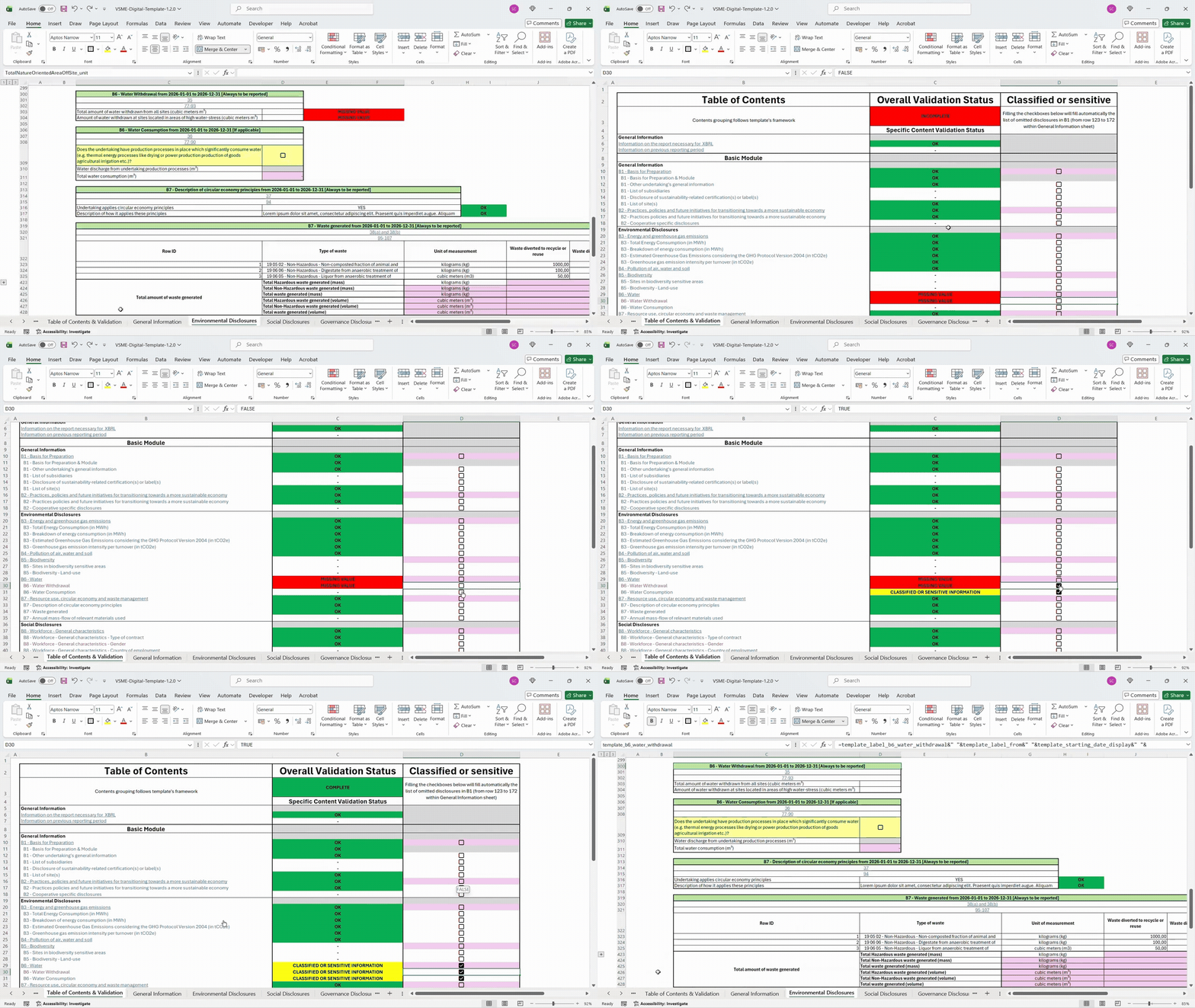
Please note that this FAQ covers only the technical aspects and functions of the VSME Digital
Template and Converter. This FAQ does not cover any content related questions regarding the VSME.
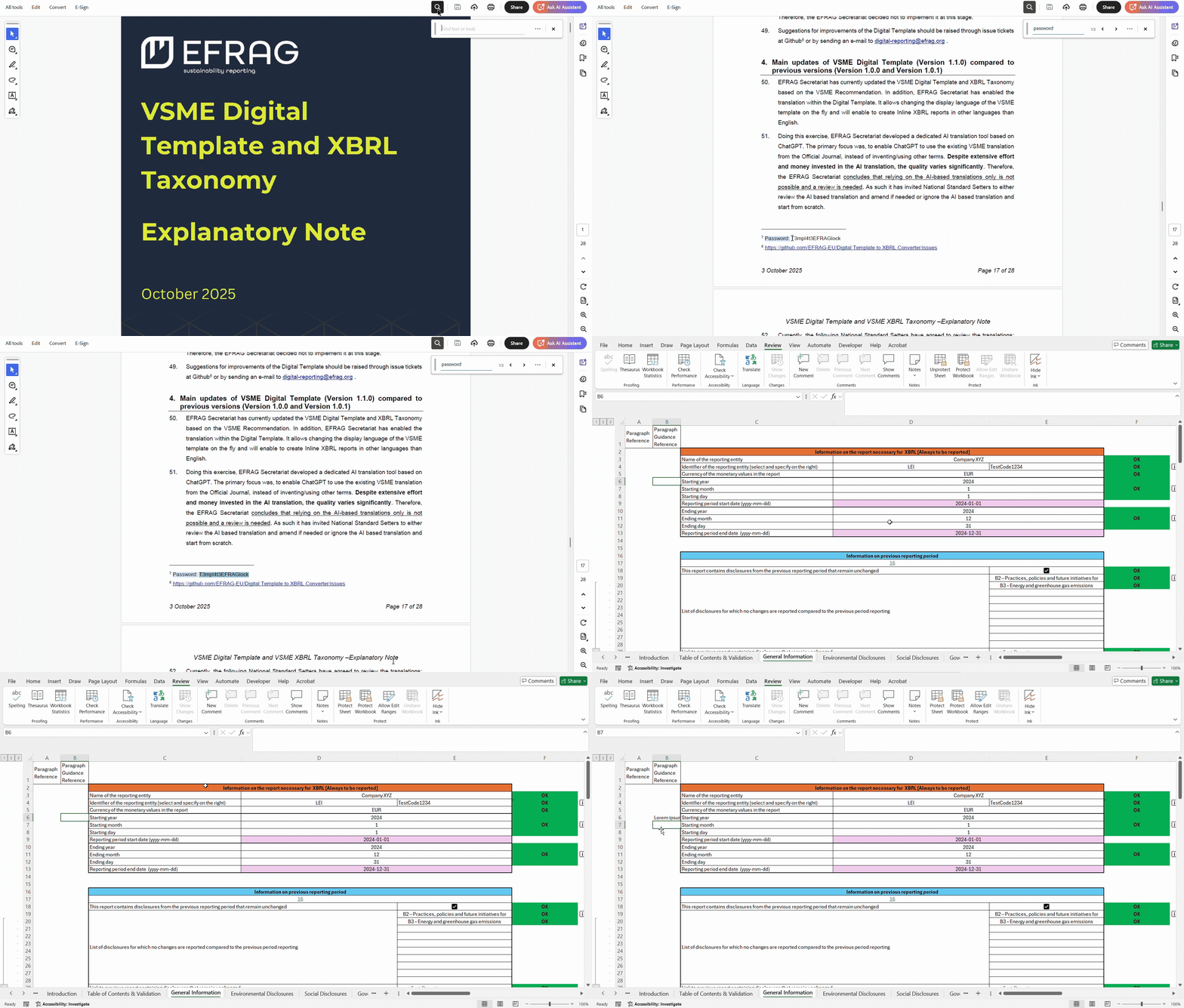
1. How could I unlock the template? Could I modify the structure of the template?
To unlock the template the following password is needed: T3mpl4t3EFRAGlock.
Please, be aware that unlocking and modifying the cells could lead to problem during the conversion of
the VSME Digital Template. If market participants intend to change the template, they must be aware of the fact that it will no
longer be convertible.
The template contains several named ranges that allow converting data from the Digital Template in Excel
into XBRL (eXtensible Business Reporting Language). The names of the ranges are needed to produce the
conversion into an XBRL report and they are consistent with the XBRL element names of the XBRL taxonomy,
so they should not be modified. Modifying the named ranges will trigger an error in the conversion. The
same is true for the formulae implementing the validation rules, changing them might make impossible to
convert the template.
Even with the template locked it is possible to change the font and the size of the characters, the
cells format (cells size, visibility of the cells and organising the sheets) and inserting elements
(such as pictures, shapes and charts) for every cell. Moreover, new sheets can be freely added, these
will be unlocked by default.
2. Why is the template not working correctly as expected?
If the template is not working as expected (e.g. validations with error even if the inputs inserted are
correct or conversion in failure) please follow these steps:
-
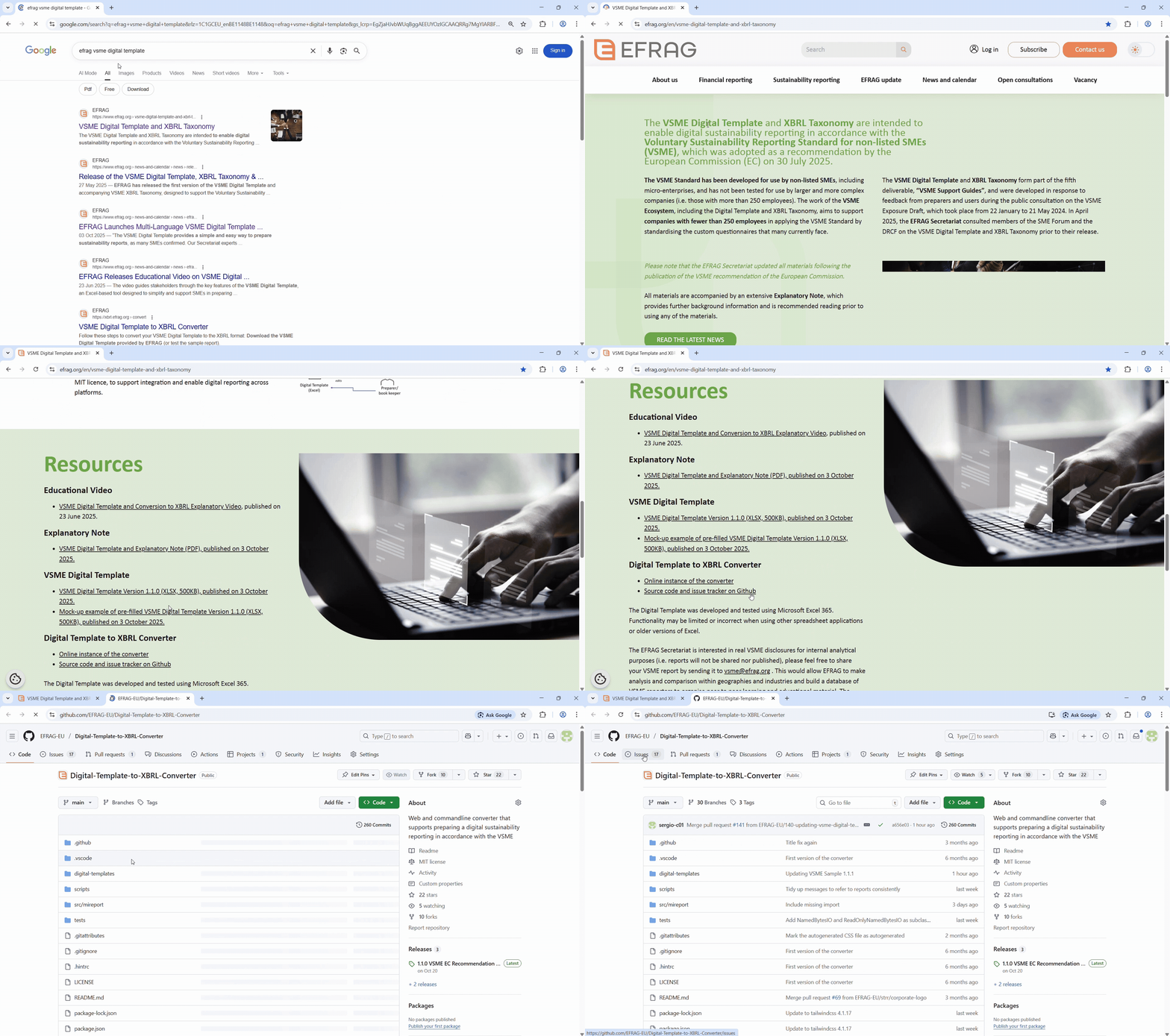
Check that you are using the latest template version in
EFRAG's website;
-
Check that you are using the Excel desktop version, since the Digital Template was developed and
tested using Microsoft Excel 365. Functionality may be limited or incorrect when using other spreadsheet
applications or older versions of Excel;
-
Check that the Overall Validation Status in the “Table of Contents & Validation” sheet is Complete;
-
If the validation(s) are not working you can unlock it and try to investigate the error;
-
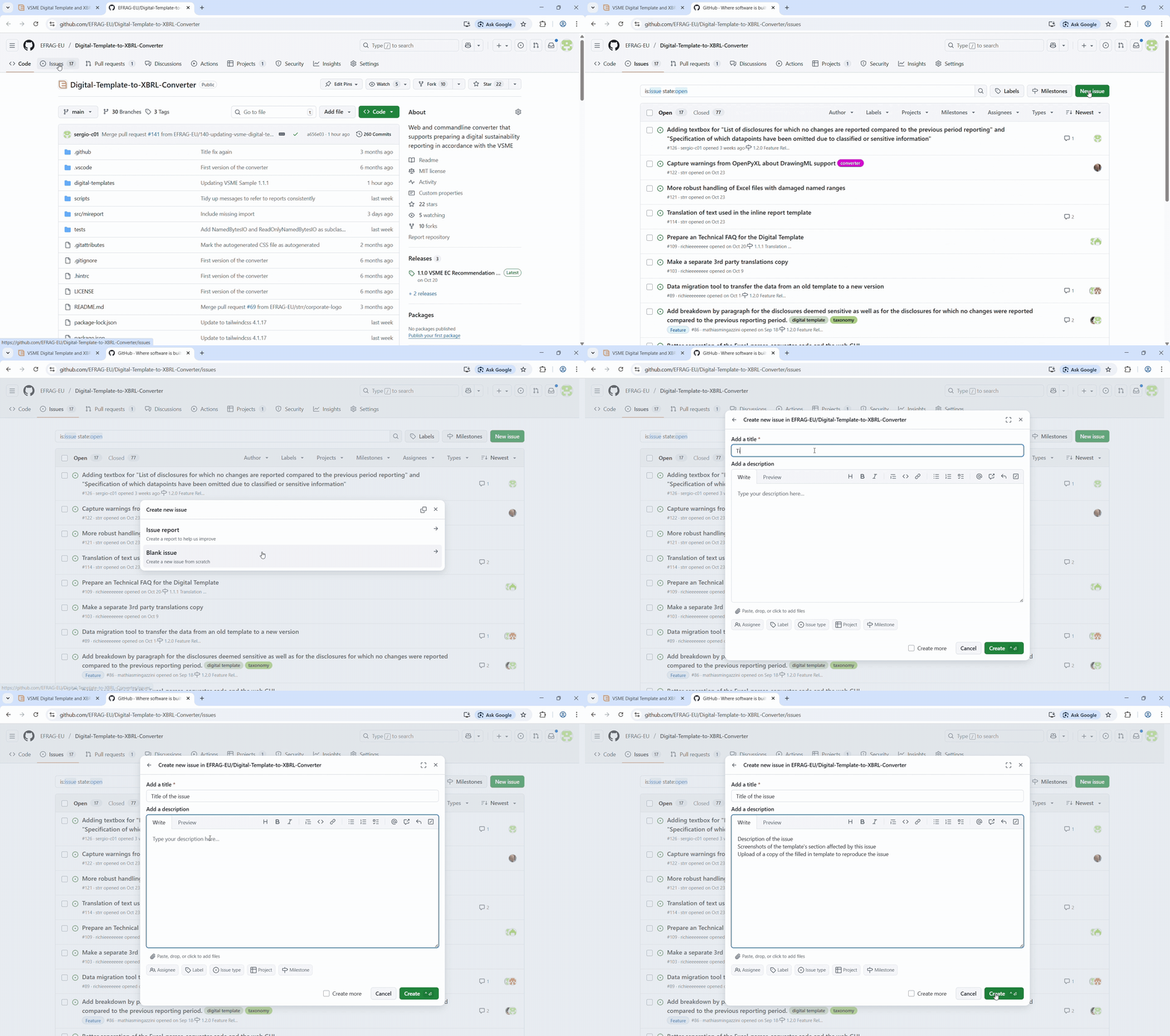
Look into GitHub if your problem has
been already fixed or if an existing solution does exist. If the error persists, please report it to us
as a new blank issue.
3. Why are there a lot of named ranges in the Template? Can they be changed?
The names of the ranges are needed to produce the conversion into an XBRL report and they are consistent
with the XBRL element names of the XBRL taxonomy, so they should not be modified. Modifying the named
ranges will trigger an error in the conversion.
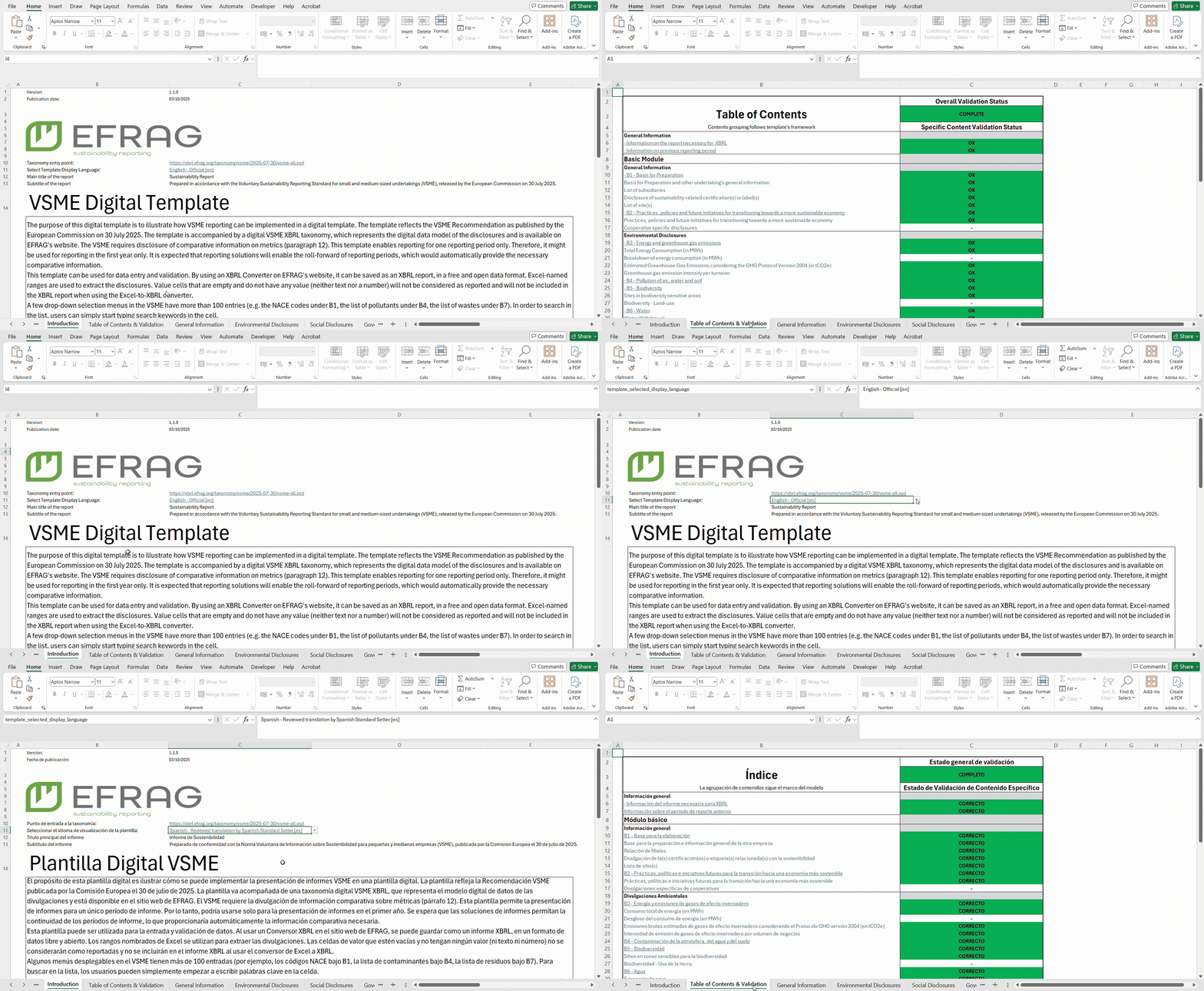
4. How could I change the language of the VSME Digital Template?
In order to change the language of the VSME Digital Template it is needed to go on the cell C11, in the
Introduction Sheet, and select the preferred one. All the available languages are displayed in the
dropdown list in correspondence of the cell.
5. Why the VSME Digital Template is not fully translated in the selected language?
The VSME Digital Template at the moment does not include the translations (other than English) of
dropdowns within cells NACE codes list,
wastes list and
pollutants list. These have not
been implemented at this stage as it would require creating macros in the template which would
compromise the user-friendliness. As a consequence, the inline XBRL report generated by the converter
will not be fully in the language selected by the undertaking in the template (i.e. the dropdown lists
for example will be still in English even if the inline XBRL report is in Spanish). If EFRAG receives
the funding required to continue the work on the template next year, EFRAG Secretariat will then delve
into this problem and will explore possible options to solve it.
6. Where can I raise content related questions?
At the moment there is no official channel, but EFRAG is considering to create one for the year 2026.
7. Can I report for more than one reporting year?
No, this VSME Digital Template enables reporting for one reporting period only. It is expected that
reporting solutions will enable the roll-forward of reporting periods, which would automatically provide
the necessary comparative information. However, EFRAG is evaluating the option of supporting the
multiperiod reporting in the future.
8. Does the undertaking need to fill each cell in the template to have a complete report and a successful conversion?
No, the undertaking does not have to fill necessarily each cell in the template to have a successful
conversion. Depending on the applicability of the disclosures (yellow checkboxes that indicate the
conditions of applicability), the undertaking will need to report on them.
In addition, the undertaking should check the “tables of contents and validation” sheet to understand whether the report is complete
such that it can proceed to the conversion.
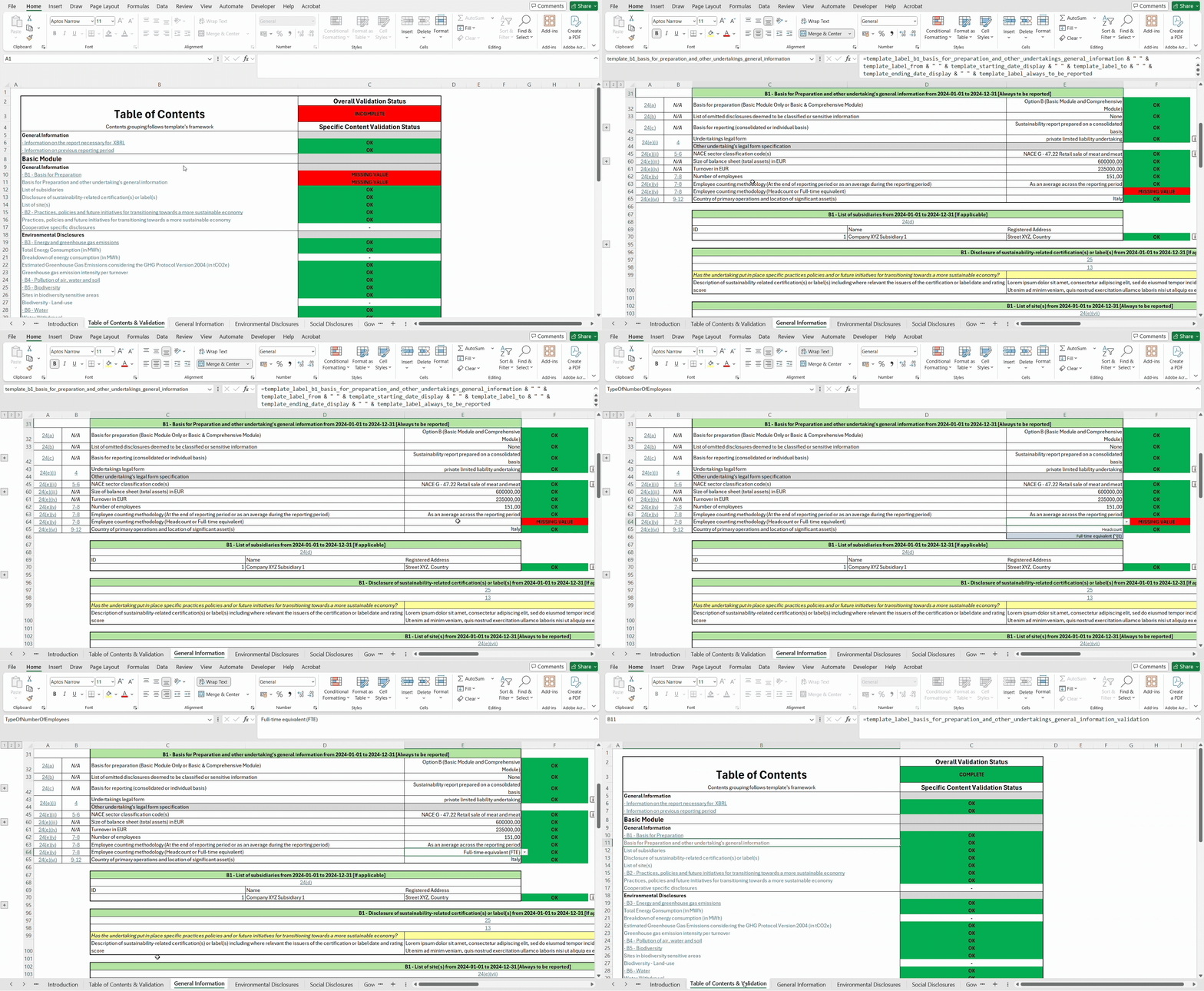
9. How can I keep track of the changes I am making in the template? Is there a way of checking the overall validation status of the Template?
In order to increase the user friendliness of the Digital Template an overall table of content with
respective validation for each disclosure has been included. In practice, this means that the
undertaking can always check whether it has correctly filled in the disclosures it wants to report on or
if something is missing. If the disclosure is completed correctly, “OK” will appear. If a disclosure is
not prepared correctly “MISSING VALUE”, “VALUE INCONSISTENCY”, “ERROR” or “INVALID URL” will appear.
Before uploading the Digital Template file to the XBRL converter, it is recommended that the undertaking
verifies that the overall validation status is “COMPLETE”. If disclosures are not filled in correctly,
“INCOMPLETE” will appear in the overall validation status.
10. What if I need more rows?
The EFRAG Secretariat included a number of empty sample rows in the VSME Digital Template. Those rows
are hidden by default (grouped) and need to be expanded by the user by clicking the plus icon on the
left side. These rows, for each expansion, are a total of 100.
The list of items for which you might need an expansion of the rows is the following:
-
NACE sector classification codes
[B1 - Basis for Preparation and other undertaking's general information];
-
Subsidiaries [B1 - List of subsidiaries];
-
List of site(s) [B1 - List of site(s)];
-
Types of pollutant
[B4 – Pollution of air water and soil];
-
Sites in biodiversity sensitive areas [B5 - Sites in biodiversity sensitive areas];
-
Types of waste
[B7 - Waste generated];
-
Names of key material [B7 - Annual mass-flow of relevant materials used];
-
Countries of employment contract [B8 - Workforce – General characteristics - Country of employment].
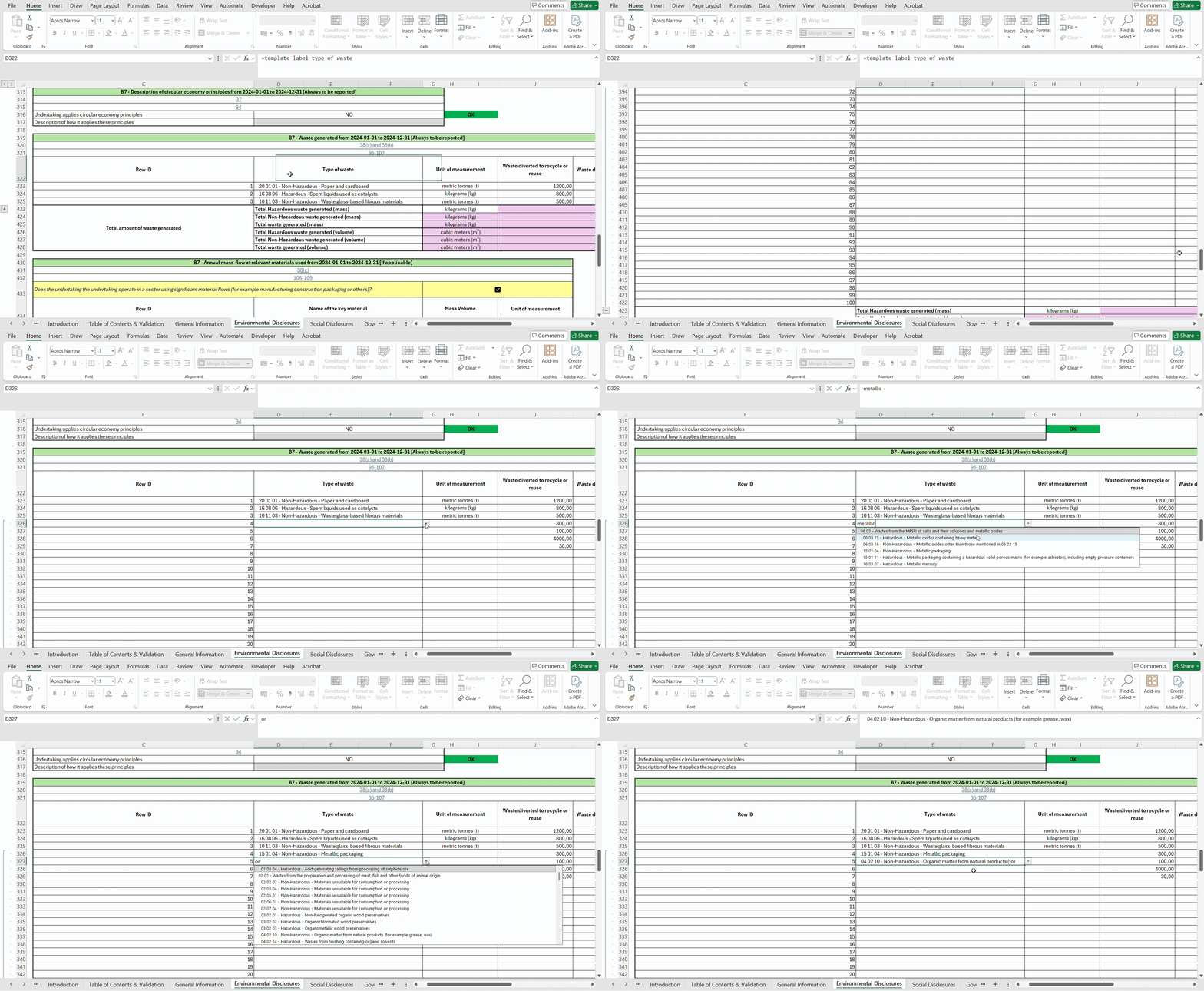
11. Some drop-down menus have lists with more than 100 entries, how could I find the element I’m looking for?
In order to search in the list, undertakings can simply search keywords within the dropdown-menu cell.
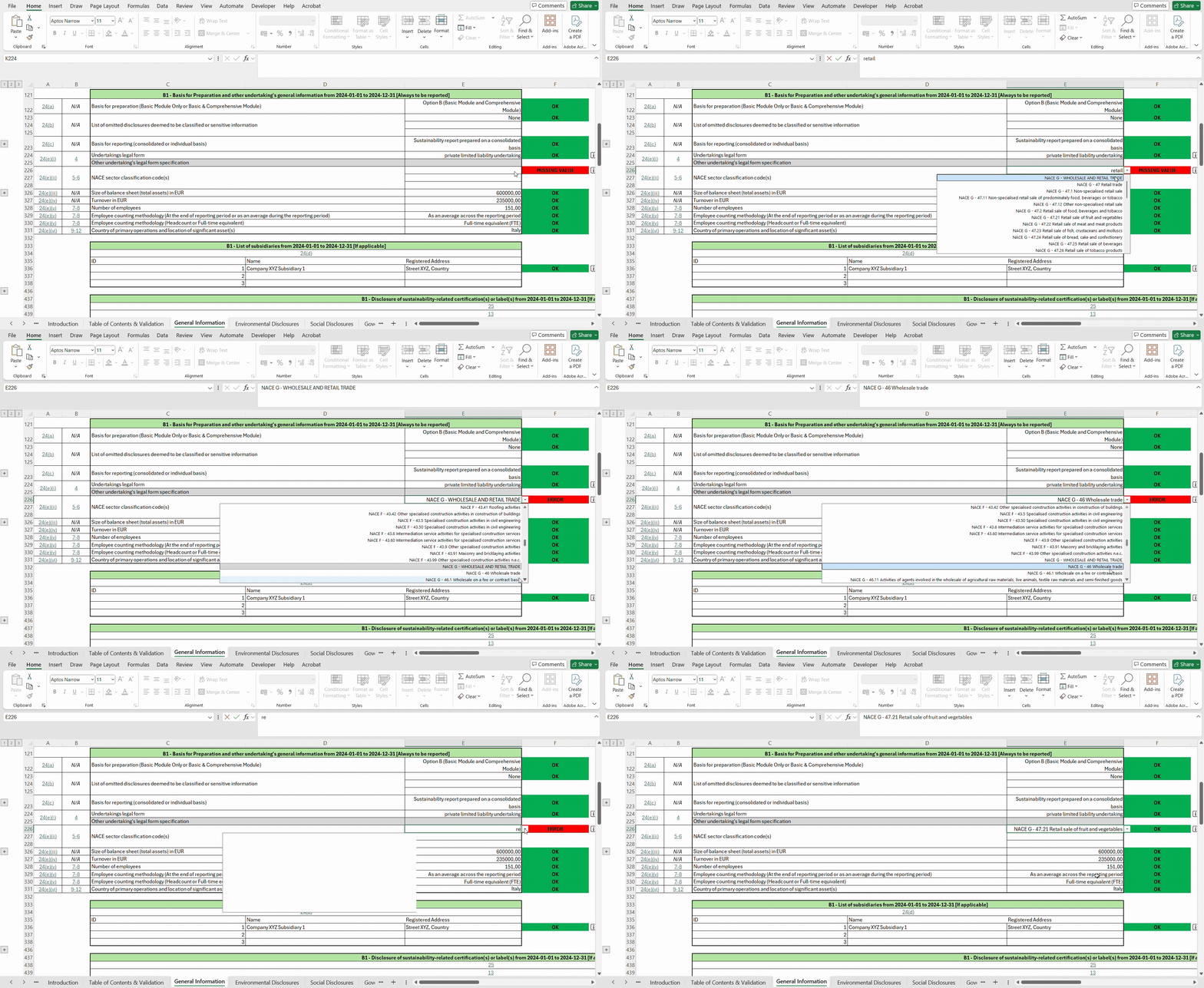
12. Why is an ERROR message displayed when I select some NACE codes?
The ERROR message is displayed when the NACE codes selected are not NACE classes, but headlines of NACE
divisions or NACE groups. For instance, all the NACE classes are characterised by 4 digits before the
class name (e.g. NACE G - 47.21 Retail sale of fruit and vegetables).
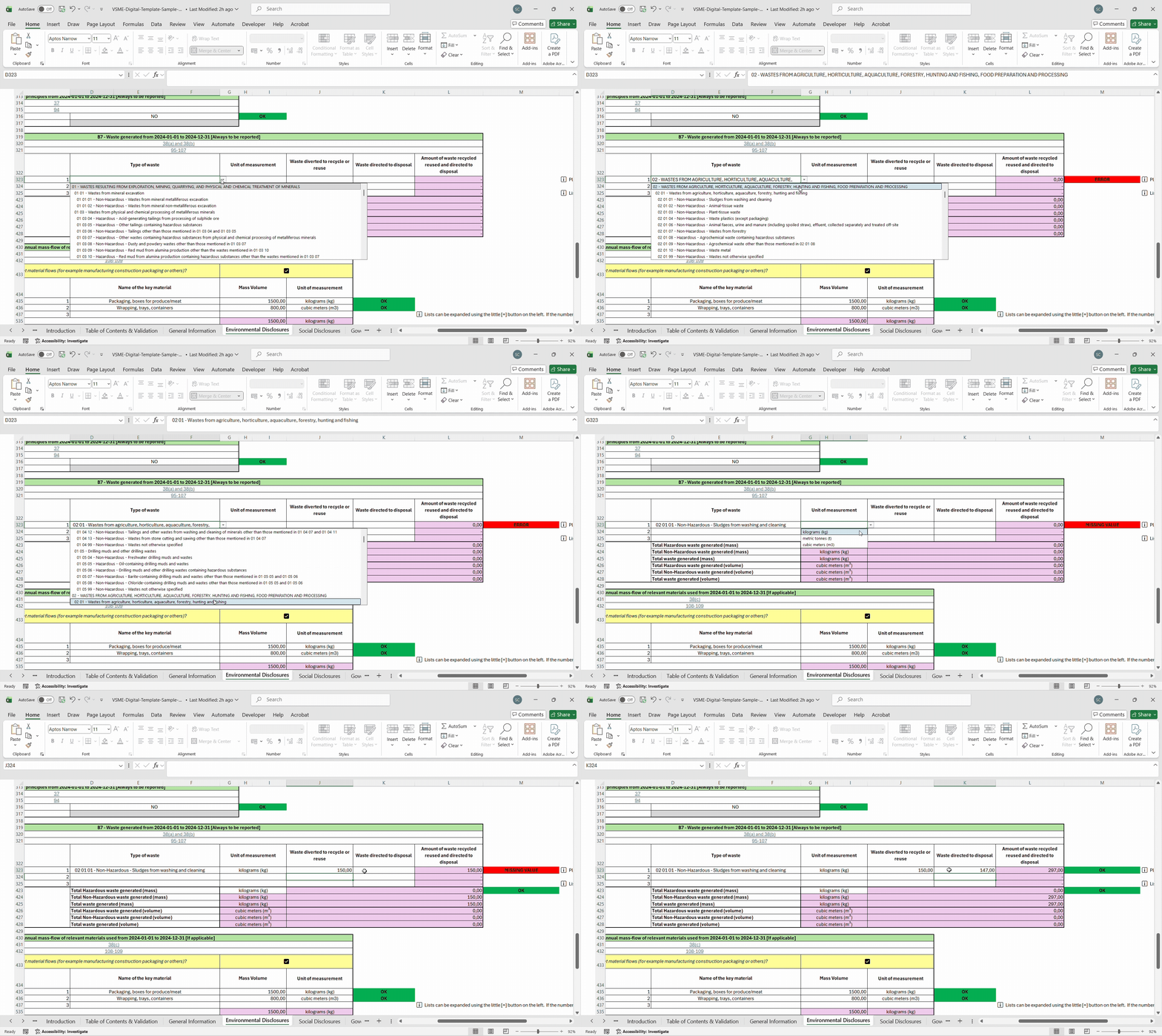
13. Why is an ERROR message displayed when I select some wastes codes?
The ERROR message is displayed when the wastes selected are not six-digit code for the wastes, but the
two-digit or four-digit chapter headings.
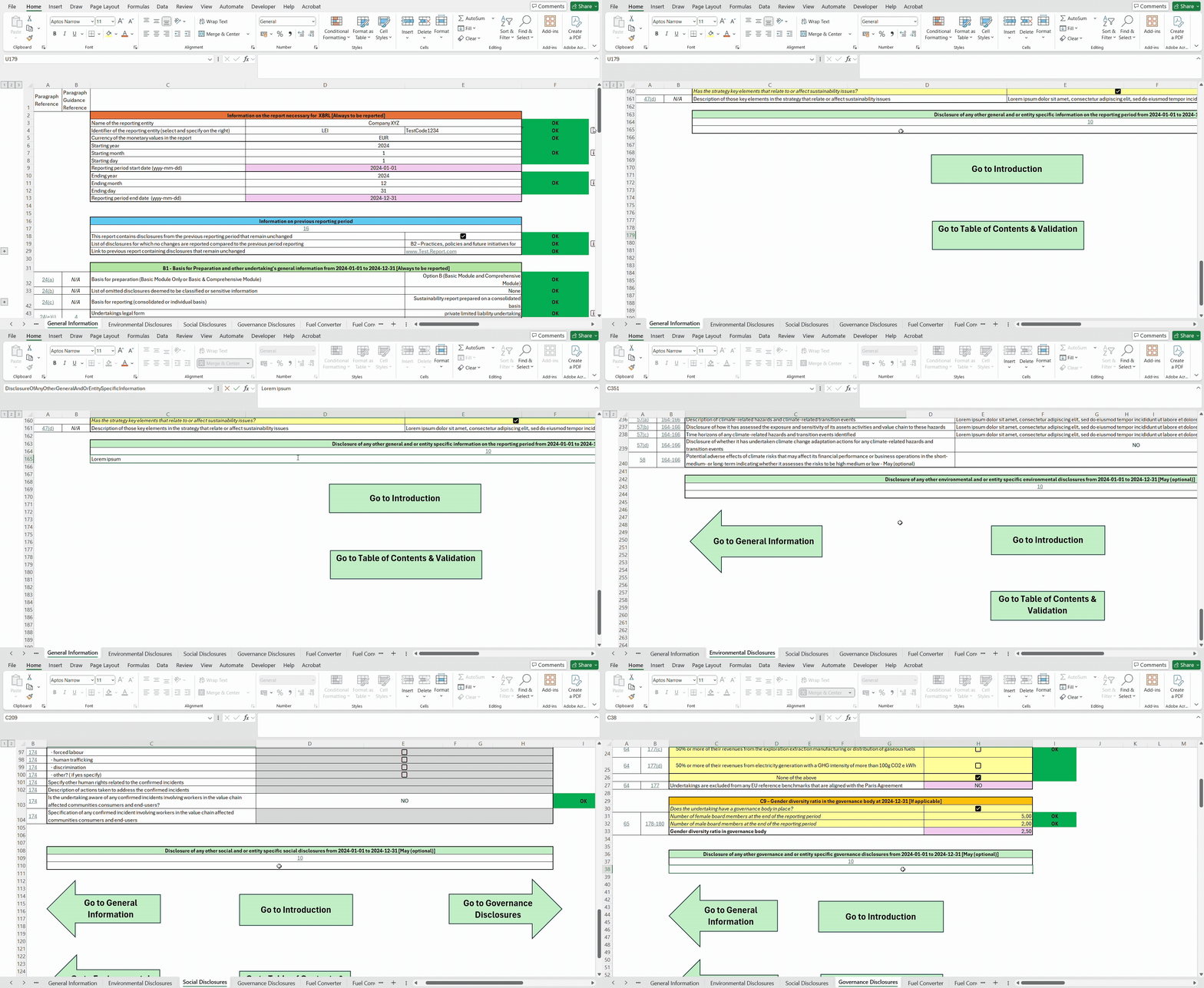
14. I would like to provide some additional entity specific information on top of what is requested by VSME, how can I do it?
Following paragraph 10 and 11 of the VSME Standard, if the undertaking wishes to provide additional
information (metrics and/or narrative disclosures) not covered by the VSME Standard, it may do so using
the dedicated “Other disclosure” cells found at the end of each sheet.
15. Once I have completed the Digital Template and converted it, how could I send the report to my bank?
To share the report with the banks, the undertaking should download the machine readable files in the
converter (XBRL Report and xBRL-JSON) as these are the files which can be technically imported into existing
databases. EFRAG is currently evaluating the possibility of implementing a distribution hub that would
allow to distribute the report to data providers and banks. If you are interested in this project, please
contact and share the report with us using this email ([DigitalReporting@efrag.org]
(mailto:DigitalReporting@efrag.org)).
Please note, in case the undertaking would like to publish the inline-XBRL report on its website it may do
so according to paragraph 17 of the VSME
Recommendation.
16. Does the VSME Digital Template allow reporting of multiple entities in one report?
No, the VSME Digital Template doesn’t allow reporting of multiple entities in the same excel, as per
the VSME Recommendation the report should be either prepared on an individual basis (i.e. the report
is limited to the undertaking’s information only) or on a consolidated basis (i.e. the report includes
information about the undertaking and its subsidiaries).
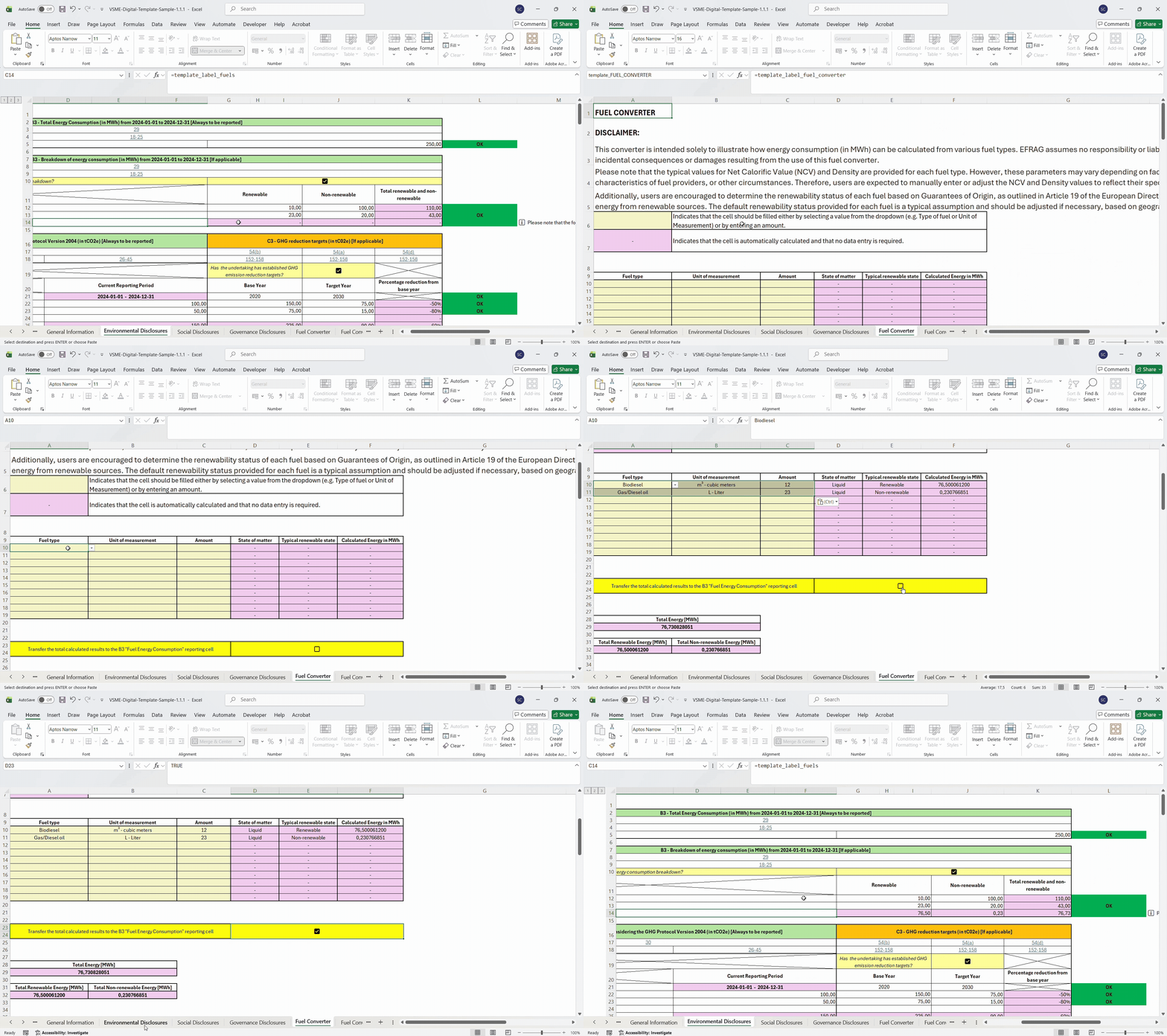
17. How does the fuel converter work?
The purpose of the converter is to illustrate how energy consumption in MWh can be calculated for
various fuel types.
Below the steps on how to use the Fuel Converter:
-
In cell A9 select the Fuel used, searching for it or scrolling down the list displayed clicking the
cell;
-
In cell B9 select the Unit of measurement used;
-
In cell C9 select the Amount of fuel used;
-
In cell D9 it is displayed the State of matter for the Fuel selected;
-
In cell E9 it is displayed the Typical renewability state for the Fuel selected;
-
In cell F9 is displayed the Energy produced in Mega Watt hours by the Amount of Fuel specified;
-
In cell A28 is displayed the Total Energy in Mega Watt hours;
-
In cell A31 is displayed the Total Renewable Energy in Mega Watt hours;
-
In cell B31 is displayed the Total Non-renewable Energy in Mega Watt hours;
Please note that the source of the typical values (Net Calorific Value and Density) is provided for
each fuel in the “Fuel Converter parameters” sheet. However, those parameters might vary in different
countries, due to national specificities for example. As such, the undertaking is supposed to manually
add or change the parameters of the Net Calorific Value (NCV) and Density in the "Fuel conversion
parameters" sheet in order reflect its local circumstances and jurisdictions.
In addition, please note
the renewability status provided is the typical one. All the undertakings should provide their specific
status of renewability, which can be checked on their specific Guarantees of Origin, as outlined in
Article 19 of the European Directive 2018/2001/EC on the promotion of the use of energy from renewable
sources. The default renewability status provided for each fuel is a typical assumption and should be
adjusted, if necessary, based on jurisdictional or individual circumstances.
EFRAG assumes no responsibility or liability whatsoever for the content or any
consequences or direct, indirect or incidental damage arising from using this fuel converter.
18. Is there a Greenhouse Gas emission calculator in the template?
During the testing period that occurred in April 2025, one SME Forum member suggested adding a GHG
calculator within the VSME Digital Template. The EFRAG Secretariat recognizes the need for a GHG
calculator, however, as already mentioned in the cover letter sent to the European Commission in
December 2024, it recommends the EC to develop it. As part of the VSME Ecosystem work, the EFRAG
Secretariat has identified a number of national or international tools that can help SMEs calculate
their GHG emissions. This identification and selection of tools has been based on a Call for
Expression of Interest issued in February 2025 as mentioned in the report that was published in
September 2025. The selection of tools therefore remains preliminary. As the analysis is based on the
input received from the call for expression of interest, EFRAG cannot guarantee the exhaustive nature of
the list of tools identified.
It is also important to note that these are typically free tools, either
developed, managed or recognised by a national government. The tools are operational, and their
accessibility has been tested by the EFRAG Secretariat. Please note, that EFRAG disclaims any
responsibility for the technical quality of these tools, as they have neither been prepared nor
reviewed by EFRAG.
In addition, EFRAG will update this list periodically to include those tools
identified in the mapping analysis that are still in the design phase. To note that emission factors are
typically national, hence SMEs are expected to use GHG calculators in accordance with their country(ies)
of operation(s).
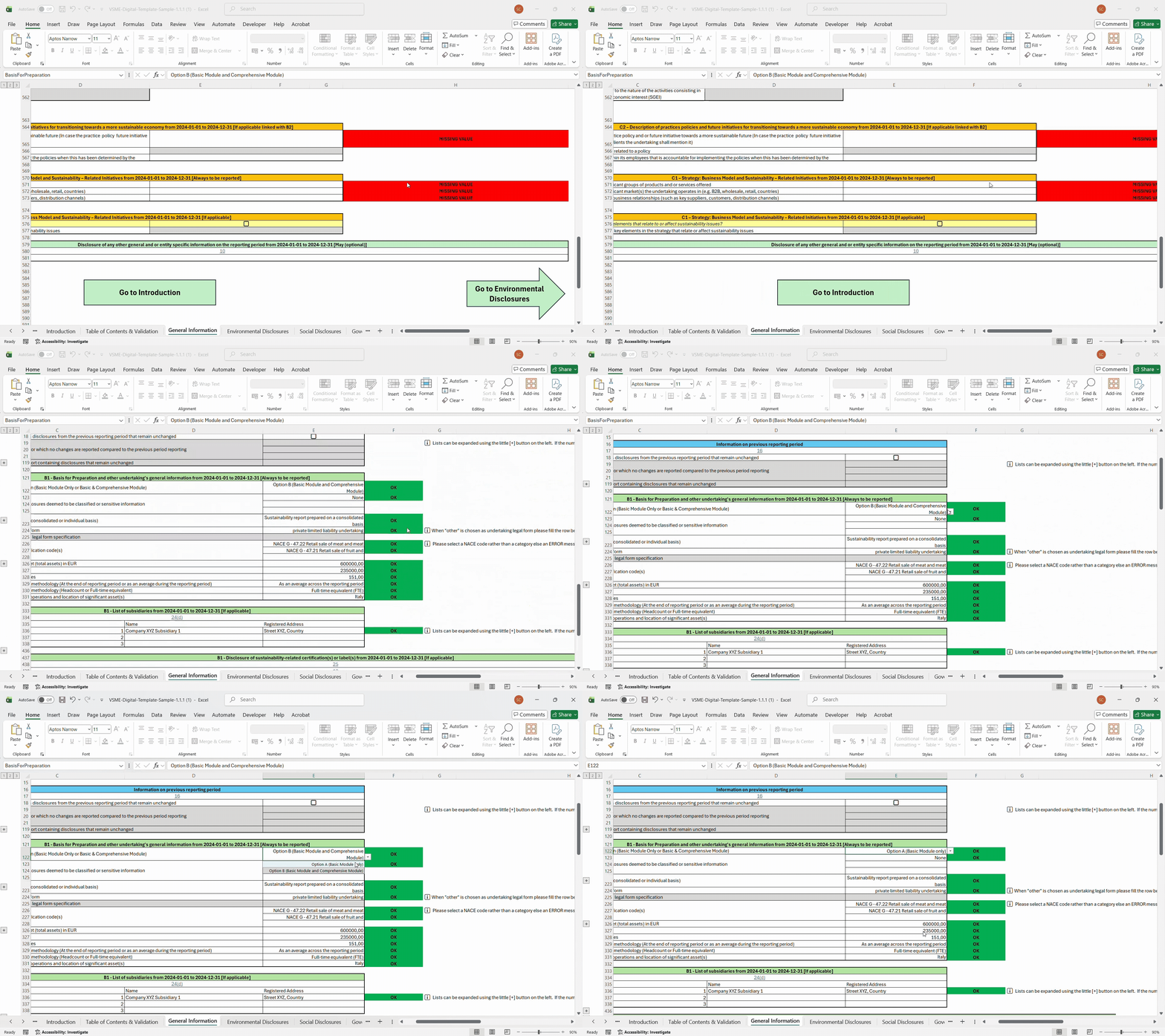
19. Is it possible to report on the Basic Module with a selection of only certain disclosures of the Comprehensive Module?
In the VSME Digital Template, as per the VSME Standard, undertakings can choose to report on Basic
Module only (Option A) or on the Basic Module and Comprehensive Module (Option B). However, it is also
possible that the undertaking can report on the Basic Module plus a selection of disclosures of the
Comprehensive Module.
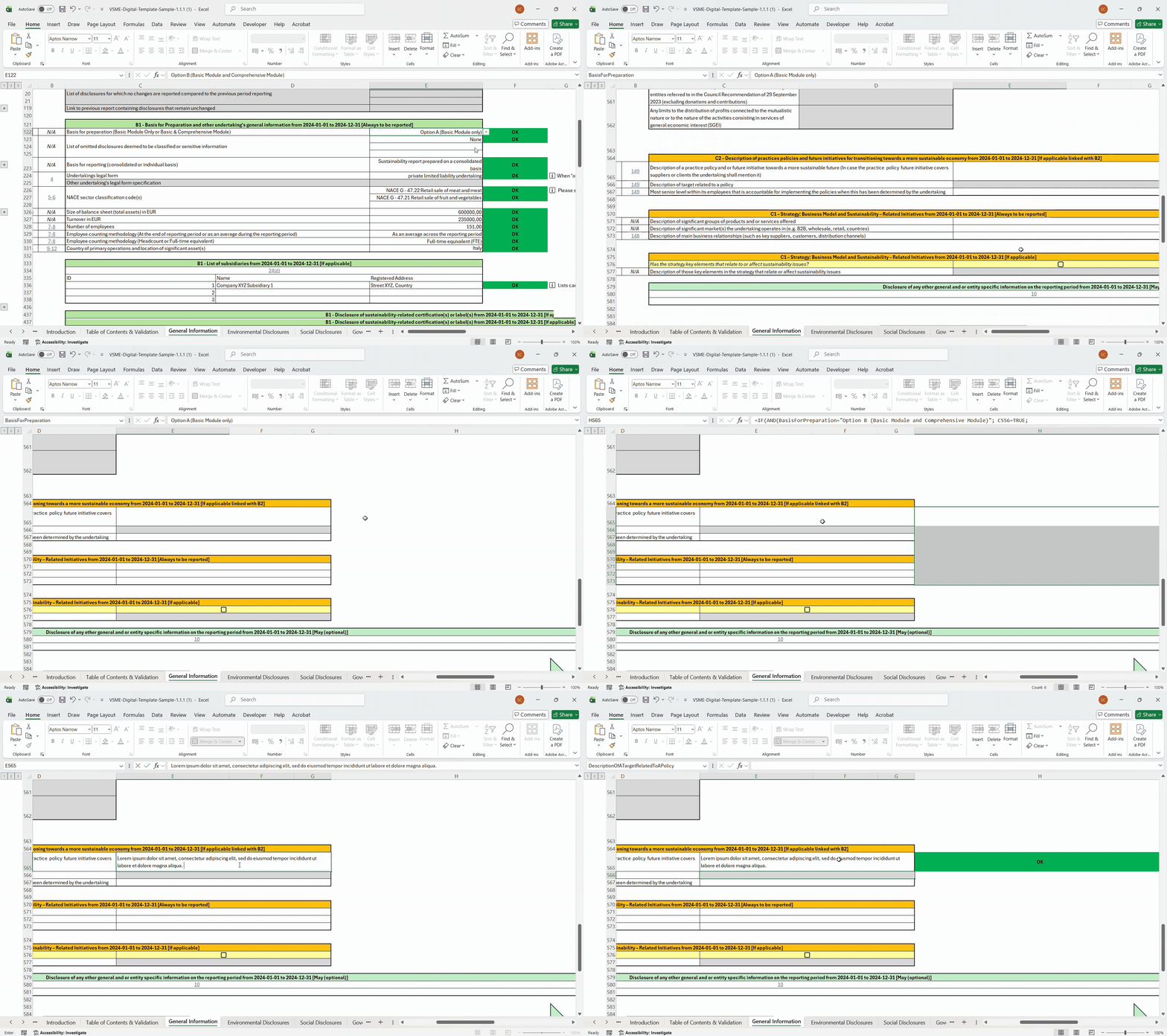
In this case, the undertaking should select “Option A (Basic Module only)” in the General Information
sheet. Selecting Option A does not lock the Comprehensive Module disclosures; instead, it simply
disables the “MISSING VALUE” validation errors. The undertaking can then complete all Basic Module
disclosures, ensure all related validations are satisfied, and subsequently fill in any chosen
Comprehensive Module disclosure(s) it wishes to report on.
Please note that in the inline XBRL report, all disclosures that the undertaking has filled in the
template will be displayed
20. If a language is not present in the VSME Digital Template, could I add my own translation to the VSME Digital Template?
It is technically possible to add a new translation to the Digital Template by unlocking the digital
template using the password provided in the Explanatory Note and using correctly the named ranges.
Please note however, that the translation will not be official and therefore EFRAG assumes no
responsibilities for the content of the translation.
Moreover, the process of adding a new translation could compromise the correct functioning and the
validations within the template. EFRAG is not liable for any issue that could arise after structural
changes made to the Digital Template by third parties in any attempt to implement new translations or
other elements.
Please note that official translations within the VSME Digital Template are those reviewed by National
Standard Setters and published on EFRAG's website. EFRAG encourages, in case the undertaking is
interested in a translation which is not available at the moment in the VSME Digital Template, to flag
the interest to relevant National Standard Setter so that they could contact directly EFRAG.
21. How can I omit classified or sensitive information?
VSME Standard allows omitting information that is deemed to be classified or sensitive by the
undertaking (see paragraph 24 (b) of VSME Recommendation). If the undertaking decides to omit such
information, the undertaking shall indicate the disclosure that has omitted. In order to allow for the
omittance of disclosures deemed to be classified or sensitive by the undertaking it has been implemented
a dedicated section within the VSME Digital Template in the "Table of Contents & Validation" sheet.
Within column D in the "Table of Contents & Validation" sheet there is the possibility to check the box
when the undertaking omits the disclosure because deemed to be classified or sensitive. Checking the box
will not only affect the Table of Contents, but also the validation rules in each sheet, switching off
the respective MISSING VALUE validation. In addition, by checking the box in the "Table of Contents &
Validation" sheet will allow an automatic filling in the “General Information” Sheet rows 123 to 174 for
the list of omitted disclosures deemed to be classified or sensitive information. It is important to
note that if the undertaking selects the “Classified and Sensitive information” checkbox in the “Table
of Contents & Validation Sheet” but fills in the information of the respective disclosure, a Warning
message will appear in the “Table of Contents & Validation Sheet”. In this case, if the undertaking
converts the Digital Template using the Converter, the information of the disclosure (even if in the
Digital Template was selected as classified or sensitive information) will appear in the Inline XBRL
report.
Below a tutorial on the functioning of the Classified or Sensitive Information in the Template.